

Many people hesitate to use online file converters, worried about security risks or complicated processes. Yet these tools can transform your workflow, saving time and eliminating the need for bulky software installations. This guide clarifies common concerns about online converters, showing you how to identify secure services, understand their benefits, and choose the right tool for your needs. You'll discover practical tips for fast, safe file conversions that fit seamlessly into your personal or professional routine.
Table of Contents
- Key takeaways
- Understanding the benefits of online converters
- Addressing security and privacy concerns with online converters
- Comparison of online converters, desktop apps, and mobile apps
- How to choose the right online converter for your needs
- Discover fast and secure online converters at Online Convert File
- Frequently asked questions
Key Takeaways
| Point | Details |
|---|---|
| Speed and simplicity | Online converters process files in seconds without software installation, enabling quick upload, format selection, and download. |
| Wide format support | Most tools handle dozens of formats from JPG and PDF to WebP and AVIF, reducing the need for multiple converters. |
| Security caveats | Security varies and deletion policies are often unclear, with risks that files may linger on servers and that malware or data scraping can occur. |
| Best practice tips | Choose trusted services with transparent deletion policies and privacy assurances, and bookmark a preferred converter for quick access. |
Understanding the benefits of online converters
Online converters enable quick access without software installation, supporting multiple file formats seamlessly. This makes them perfect for anyone who needs to transform files on the go without cluttering their device with specialized programs. Whether you're converting an image for a social media post or preparing a document for a client meeting, these tools deliver results in seconds.
The primary advantage is simplicity. You don't waste time downloading applications, managing updates, or navigating complex interfaces. Just upload your file, select the output format, and download the result. This streamlined approach works especially well for small business owners who lack dedicated IT resources but still need professional-quality file conversions.
Accessibility stands out as another major benefit. Since these tools run in your browser, you can use them from any device with internet access. Working from a coffee shop on your laptop? Need to convert a file on your tablet during a commute? The flexibility of a free image & video converter online means you're never stuck waiting until you get back to your office computer.
Format variety adds tremendous value. Most online converters support dozens of file types, from standard formats like JPG and PDF to specialized options like WebP and AVIF. This versatility eliminates the need to maintain multiple conversion tools. One platform handles your documents, images, videos, and audio files without switching between different applications.
Pro Tip: Bookmark your preferred online converter and use it to quickly prepare files for client presentations or social media sharing. Having instant access saves valuable time when deadlines approach.
Speed matters too. Modern online converters process files in seconds, not minutes. This efficiency becomes crucial when you're juggling multiple tasks or working under tight deadlines. The time you save adds up quickly, especially if you handle file conversions regularly as part of your workflow.
Addressing security and privacy concerns with online converters
Security worries keep many users from trying online converters, and these concerns deserve serious attention. Only 18% of online converters guarantee immediate file deletion, while data breaches have occurred in the image conversion sector. Understanding these risks helps you make informed decisions about which services to trust.

The main vulnerability involves file storage. When you upload a file to a converter, it typically lands on the service's server for processing. If that server stores your file indefinitely or shares it with third parties, your sensitive information could be exposed. This becomes especially problematic with confidential business documents, personal photos, or financial records.
Malware poses another threat. Some free converter sites display aggressive advertisements that may contain malicious code. Clicking the wrong button could trigger unwanted downloads or expose your device to security risks. Data scraping represents a subtler danger, where services collect metadata from your files to build user profiles or sell information to advertisers.
"The majority of online file conversion services lack transparent deletion policies, leaving users vulnerable to potential data misuse and privacy violations."
Protecting yourself requires vigilance. Look for converters that explicitly state their file deletion policies on their homepage or privacy page. Trustworthy services delete files immediately after conversion or within a few hours at most. Avoid platforms that provide vague language about data retention or fail to mention deletion timelines entirely.
Using security-focused converters like those for BMP to WebP conversion that process files locally in your browser eliminates server storage risks entirely. These browser-based tools never upload your files to external servers, keeping your data completely private. This approach offers the best security for sensitive materials.
Pro Tip: When converting confidential files, use a VPN or encrypted connection to add an extra security layer. This protects your data during transmission and makes it harder for third parties to intercept your files.
Red flags help identify risky services. Be wary of sites that require account creation for basic conversions, display excessive pop-up ads, or lack HTTPS encryption. Read user reviews to learn about others' experiences with security risks of online converters. A few minutes of research prevents potential headaches later.
For non-sensitive files like social media images or general documents, security concerns diminish significantly. The key is matching your converter choice to your specific privacy needs. Casual conversions tolerate more risk than business-critical or personal documents.
Comparison of online converters, desktop apps, and mobile apps
Choosing between online converters, desktop applications, and mobile apps depends on your priorities around convenience, security, and functionality. Each option offers distinct advantages that suit different use cases and user preferences.
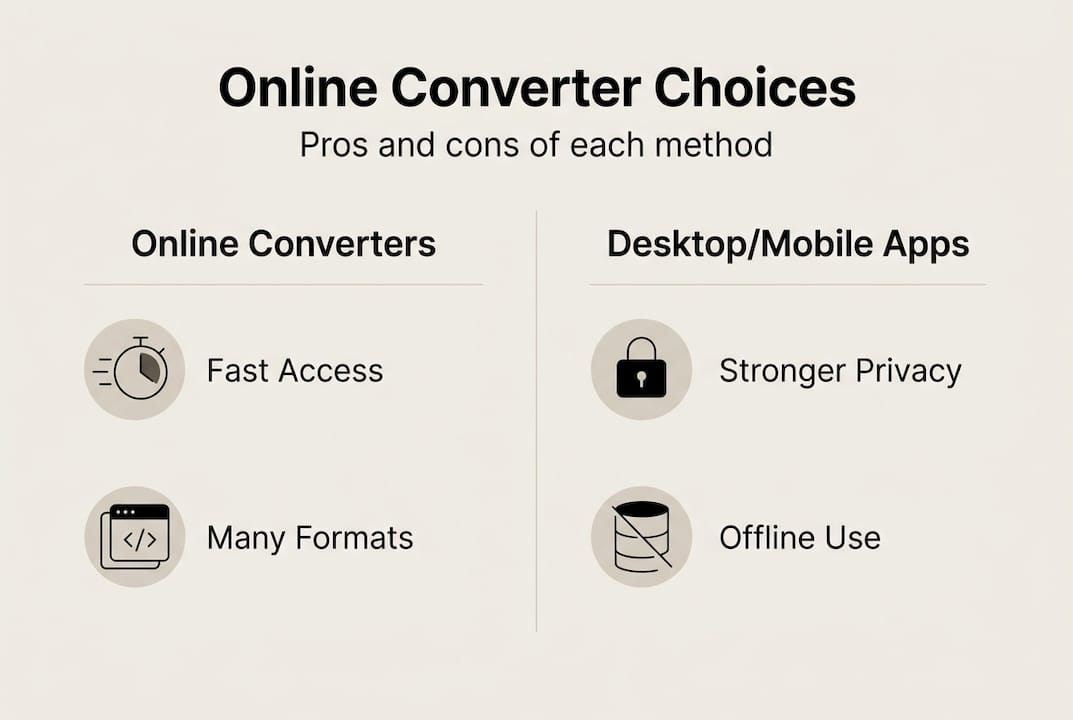
Online converters offer ease of use and accessibility, while desktop apps often provide stronger security and offline capabilities. Understanding these trade-offs helps you select the right tool for each situation you encounter.
| Feature | Online Converters | Desktop Apps | Mobile Apps |
|---|---|---|---|
| Installation | None required | Download and install needed | App store download required |
| Speed | Fast, internet dependent | Very fast, offline capable | Moderate, device dependent |
| Security | Varies by service | High, local processing | Moderate, platform dependent |
| Accessibility | Any device with browser | Single computer only | Smartphone or tablet only |
| Cost | Usually free | Often paid licenses | Free with ads or paid premium |
| Format Support | Extensive | Extensive | Limited by app |
Online converters shine when you need quick results without commitment. They work perfectly for occasional conversions, trying new formats, or working from different devices. The lack of installation makes them ideal for shared computers or situations where you can't install software. However, they require internet connectivity and may raise privacy concerns depending on the service.
Desktop applications excel at security and performance. Since they process files locally on your computer, your data never leaves your device. This makes them the best choice for sensitive business documents or confidential materials. They also work offline, which helps when traveling or dealing with unreliable internet. The downside is the upfront time investment for installation and the limitation to a single device.
Mobile apps provide convenience for on-the-go conversions. They're perfect for quick edits or format changes when you're away from your computer. Most integrate well with cloud storage services, making it easy to access and share converted files. However, they often support fewer formats than their desktop counterparts and may have file size limitations.
Common use cases break down clearly:
- Choose online converters for quick, one-off conversions and when working from multiple devices
- Select desktop apps for regular, high-volume conversions and sensitive file handling
- Use mobile apps for urgent conversions while traveling or when a computer isn't available
- Combine all three based on your current situation and file sensitivity level
Many professionals use a hybrid approach. They rely on secure desktop software for confidential client work but turn to a video converter online free tool for quick social media content preparation. This flexibility maximizes both security and convenience.
The best choice varies by context. A freelance designer might prefer desktop software for client projects but use online tools for personal photos. A small business owner might use mobile apps for quick invoice conversions while traveling but rely on desktop applications for financial records. Understanding your specific needs guides you to the right solution.
How to choose the right online converter for your needs
Selecting a reliable online converter requires evaluating several key factors to ensure both quality results and data security. Following a systematic approach helps you identify trustworthy services that match your specific requirements.
Start by examining the privacy policy and data handling practices. Look for explicit statements about file deletion timelines. Reputable services specify exactly when they remove your files from their servers. If a converter lacks a clear privacy policy or uses vague language about data retention, consider it a red flag and move on to alternatives.
Verify supported file formats before committing to a service. Choosing converters with clear privacy policies and multiple format support leads to better, safer user experience. Make a list of the formats you commonly work with and confirm the converter handles all of them. Some services specialize in specific file types, while others offer broader support. Matching the tool to your needs prevents frustration later.
Test the service with non-sensitive files first. This approach lets you evaluate conversion quality, speed, and ease of use without risking important data. Upload a sample image or document and examine the output carefully. Check for quality loss, formatting errors, or unexpected file size changes. A reliable converter preserves quality while optimizing file size appropriately.
Follow these steps to thoroughly vet a new converter:
- Read the privacy policy to confirm immediate file deletion after conversion
- Check user reviews on independent sites to learn about real experiences
- Verify the site uses HTTPS encryption for secure data transmission
- Test with a non-sensitive file to evaluate output quality and speed
- Look for security certifications or transparency reports if available
- Confirm the service doesn't require unnecessary permissions or account creation
User reviews provide valuable insights that official descriptions often miss. Search for feedback about reliability, hidden fees, intrusive advertising, or security incidents. Pay attention to recent reviews, as services can change ownership or policies over time. A pattern of complaints about slow processing or quality issues signals problems you'll want to avoid.
Security certifications add credibility, though not all legitimate services pursue formal accreditation. Look for mentions of compliance with data protection regulations or third-party security audits. These indicators suggest the service takes privacy seriously and follows industry best practices.
Consider the user interface and workflow efficiency. A well-designed converter makes the process intuitive, with clear buttons, helpful error messages, and straightforward format selection. Clunky interfaces waste time and increase the chance of mistakes. Services like those offering JPG to WebP conversion that prioritize user experience deliver better results with less frustration.
Pro Tip: Once you find a trusted converter that meets your needs, bookmark it and make it your go-to solution. Consistency reduces security risks and streamlines your workflow since you'll already know the interface.
Batch processing capability matters if you regularly convert multiple files. This feature saves significant time compared to processing files individually. Check whether the service limits batch sizes or requires payment for bulk conversions. Understanding these restrictions upfront prevents surprises when you need to convert many files quickly.
Speed varies considerably between services. While most modern converters work quickly, some optimize better for certain file types or sizes. If you frequently work with large video files or high-resolution images, test the converter's performance with files similar to what you'll use regularly. Slow processing defeats the purpose of using an online tool.
Discover fast and secure online converters at Online Convert File
When you need reliable file conversions without compromising security, Online Convert File delivers exactly what individuals and small business owners require. The platform offers a comprehensive selection of conversion tools that work directly in your browser, eliminating software downloads while maintaining your privacy.
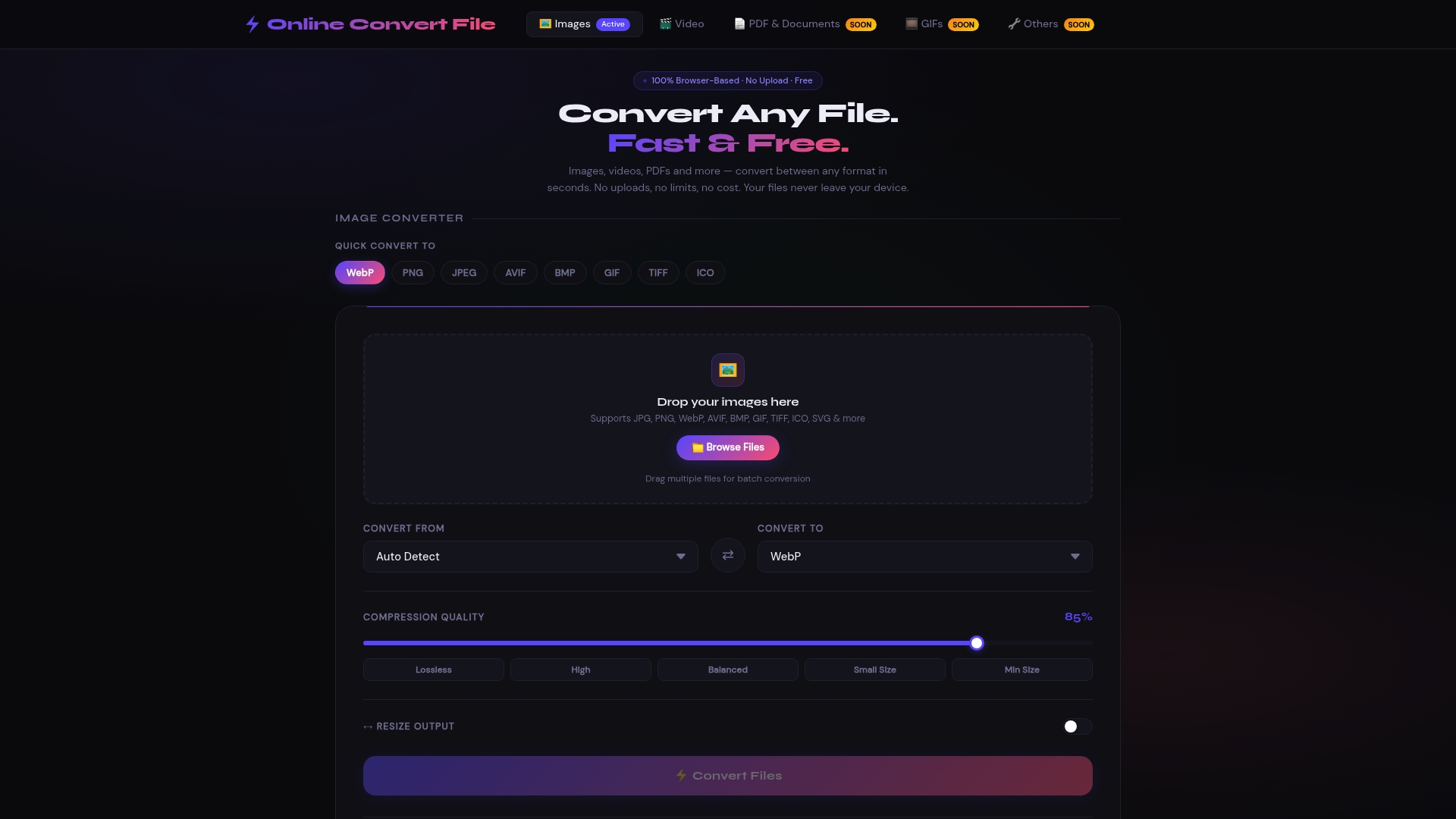
The service processes files locally using browser APIs, meaning your data never leaves your device. This approach provides the convenience of a free image & video converter online with the security of desktop software. You get instant conversions for images, videos, and documents without worrying about file storage on external servers.
Format support covers everything from common standards like JPG and PNG to modern options like WebP and AVIF. Whether you're optimizing images for faster website loading or preparing videos for social media, the platform handles your needs efficiently. The intuitive drag-and-drop interface makes conversions simple, even if you're not technically inclined.
Pro Tip: Use the video converter online free tool to optimize large video files before sharing them via email or messaging apps. Smaller file sizes mean faster uploads and happier recipients.
Batch processing saves time when you need to convert multiple files simultaneously. Instead of processing images one by one, upload several at once and let the system handle them together. This efficiency becomes invaluable when preparing content for presentations, websites, or social media campaigns.
The platform requires no account creation or registration. Simply visit the site, select your conversion type like JPG to WebP online, upload your files, and download the results. This straightforward process respects your time and privacy, making professional-quality conversions accessible to everyone.
Frequently asked questions
What are online converters?
Online converters are web-based tools that transform files from one format to another through your browser interface. They work without requiring software downloads or installations on your device. You simply upload a file, select the desired output format, and download the converted result. These services handle various file types including documents, images, videos, and audio files. The conversion happens either on the service's servers or locally in your browser, depending on the platform's architecture.
Are online file converters safe to use for sensitive documents?
Safety depends entirely on the specific service's privacy practices and data handling policies. Only a minority of services guarantee immediate deletion of uploaded files, raising legitimate privacy concerns. Before uploading sensitive documents, carefully review the converter's privacy policy to understand how long they retain files and whether they share data with third parties. For confidential materials, consider using converters that process files locally in your browser or opt for desktop software instead. When in doubt about a service's security practices, avoid uploading personal or sensitive documents.
What file formats can online converters handle?
Most comprehensive online converters support a wide range of formats across multiple media types. Common document formats include PDF, DOCX, TXT, and RTF. Image converters typically handle JPG, PNG, GIF, WebP, AVIF, TIFF, BMP, and SVG. Video converters work with MP4, AVI, MOV, and WebM among others. Audio formats like MP3, WAV, and AAC are also widely supported. The specific formats available depend on the service you choose. Platforms offering JPG to WebP conversion often provide dozens of format combinations to meet diverse user needs. Always verify that your required formats are supported before starting a conversion project.
Can I use online converters without installing software?
Yes, that's the primary advantage of online converters. They operate entirely through your web browser, requiring no downloads, installations, or system configurations. You can access these tools from any device with internet connectivity and a modern browser. This makes them perfect for situations where you can't install software, such as on shared computers, work devices with restricted permissions, or when traveling. Services like free image & video converter online platforms demonstrate how browser-based tools provide full functionality without any installation requirements. Simply navigate to the website, perform your conversion, and close the tab when finished.